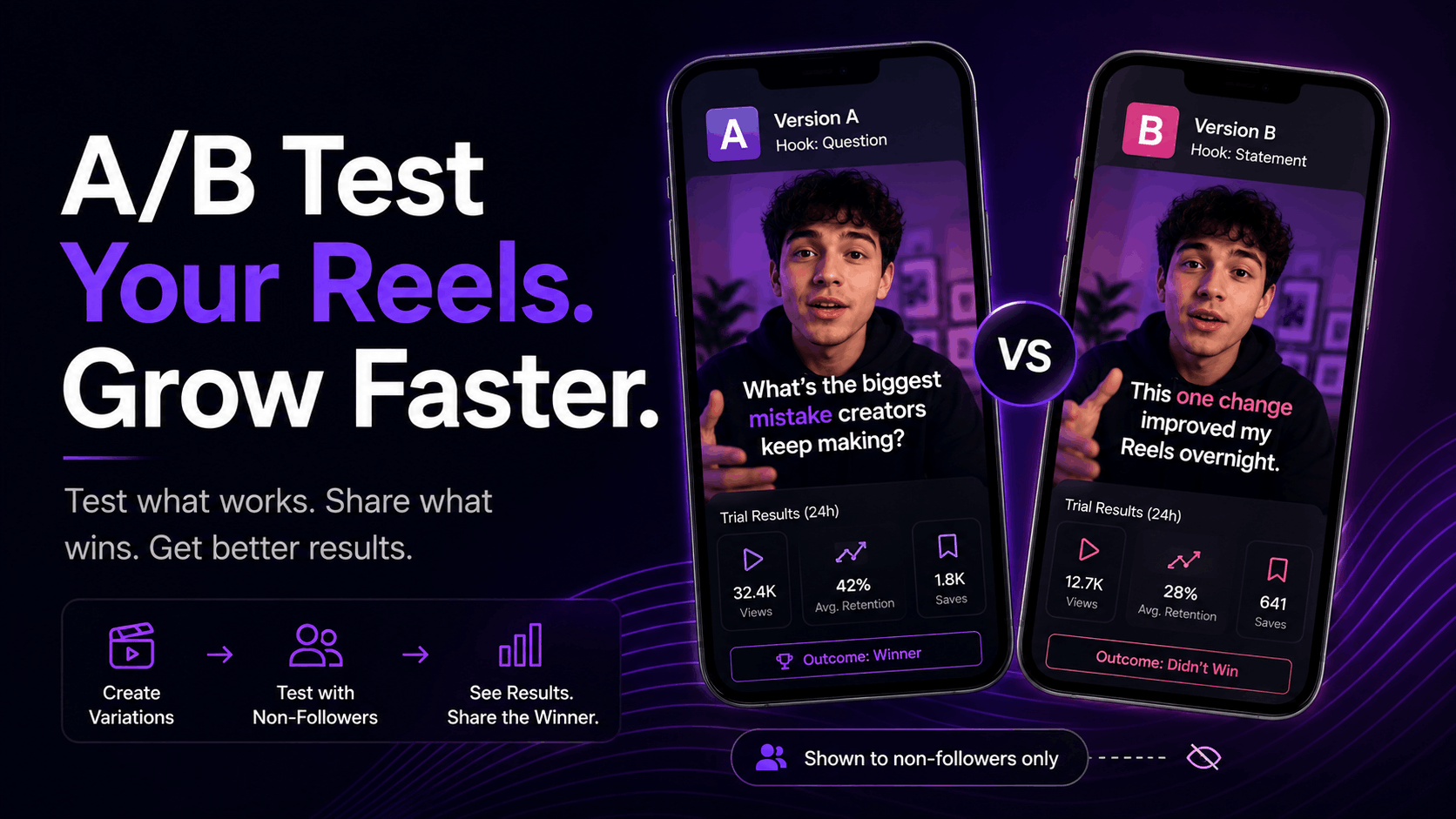
TL;DR: A/B testing your Reels means posting two or more versions of the same idea, changing one thing at a time, and letting the data tell you which version wins. Instagram's built-in Trial Reels feature does this for free by showing your Reel to non-followers before it ever touches your main feed. This guide covers how Trial Reels work, exactly what to test, how many tests you need before you trust the results, and which metrics actually matter once the numbers come in.
Two creators post the same Reel idea on the same day. One gets 900 views. The other gets 90,000. Same topic, same platform, same effort. The only difference is that one of them already knew what worked, because they tested it first.
Most creators skip testing entirely. They post, hope, and move on to the next idea whether the last one worked or not. That's a slow way to grow, because you're rebuilding your understanding of your audience from scratch every single time.
A/B testing fixes that. Instead of guessing which hook, caption, or visual style will land, you post small variations, measure the response, and only commit your full audience to the version that actually performs. Instagram now makes this easy with a feature called Trial Reels, and creators who use it systematically get a real edge over creators who don't.
Here's exactly how to run the test, what to change, and how to read the results without fooling yourself.
What Is A/B Testing for Instagram Reels?
A/B testing for Reels means creating two versions of the same video that differ in exactly one way, then comparing how each one performs before deciding which to fully commit to. Version A might use one hook, version B a different one, while everything else stays identical. Whichever version gets stronger retention, saves, or shares tells you what your audience actually responds to.
The point isn't to guess better. It's to stop guessing. Every test replaces an opinion about what "should" work with a real number from real viewers.
Before Instagram built native testing tools, creators split content across separate accounts or manually watched engagement in the first hour and hoped for signal. It was messy and slow. That changed with the arrival of an official testing feature built directly into the app.
How Do Instagram Trial Reels Work?
Trial Reels are Instagram's built-in A/B testing tool. When you publish a Reel as a trial, it's shown only to non-followers through Explore and recommendations, and your existing followers never see it unless you choose to share it later. After about 24 hours, Instagram reports back performance data from that cold audience so you can decide whether the Reel is worth publishing to everyone.
The feature started as an internal test Meta called Experiment mode before it evolved into Trial Reels, and it's been expanding steadily since. As of February 2026 you can also schedule Trial Reels in advance, which makes it realistic to batch a week of tests in one sitting instead of publishing them one at a time.
Eligibility is straightforward. You need a public account with at least 1,000 followers, since Instagram needs a baseline of normal performance to compare your trial against. If you're posting a documentation-style series and tracking your retention benchmarks against a wider playbook, Trial Reels is the fastest way to find out which version of a video actually earns that retention before you commit your whole audience to it.
One important rule worth knowing before you start: reposting an already-viral Reel as a new trial is now flagged as spam. The feature only rewards genuinely new content, not recycled winners.
What Should You Actually Test in Your Reels?
You should test one variable at a time: the hook, the caption or text overlay, the audio, the visual style, or the call to action. Changing more than one element in the same test makes it impossible to know what actually caused the difference in performance.
Hooks matter most. The first three seconds decide whether a viewer stays or scrolls, and thumbnail or first-frame text is often the single biggest factor separating a Reel that gets 5% retention from one that gets 40%. A vague hook like "this hack changed everything" underperforms a specific one like "this caption formula tripled my saves in one week", because specificity creates a clear, keepable promise instead of empty curiosity.
Caption style is the second most useful test. Try a version with bold text overlays against one with none at all, since text presence changes how viewers engage even when the underlying video is identical. One creator running this exact test found that swapping a before-and-after thumbnail for a tip-based hook doubled their save rate on the same clip.
Audio, visual tone, and CTA phrasing round out the list. Music style, color grading, and how directly you ask for a follow, comment, or click can each shift performance meaningfully on their own, so isolate them one test at a time rather than bundling changes together.
How to Set Up and Run a Trial Reel
Running your first test takes a few minutes once you know the flow. Here's the process:
Pick one variable to change. Decide up front whether this test is about the hook, the caption, the audio, or the visual style. Write it down before you film so you don't drift into changing three things at once.
Film or select your two versions. Keep everything except the tested variable identical, including length, pacing, and topic.
Publish the first version as a trial. When creating a new Reel, toggle the trial or "Test" option before posting. Instagram sends it to non-followers only.
Wait the full 24 hours. Metrics populate progressively, and judging results before the window closes gives you an incomplete read on how the video is actually performing.
Publish the second version as its own trial. Space it out so the two trials aren't competing for the exact same pool of non-followers at the exact same time.
Compare the results and decide. Share the stronger version to your main feed. Archive or iterate on the weaker one.
If you'd rather see a quick read on a single video before committing to a full testing cycle, running it through a free video analyzer gives you a signal breakdown in under a minute.
How Many Tests Do You Need Before You Trust the Data?
Run two to three variations of the same concept per week to start seeing meaningful patterns within four to six weeks. A single trial can tell you something, but one data point is noise until you've seen the same pattern repeat across multiple tests.
This matters more than most creators realize. One or two trials won't produce statistically useful patterns, but a consistent weekly cadence will. Treat testing like an ongoing habit, not a one-time experiment you run before a big launch.
Build a small backlog of testable ideas so you're never stuck deciding what to test next. A rolling list of 10 to 20 testable concepts keeps the pipeline moving and stops you from repeating the same hook format out of habit. If you're producing content daily, this is also where tracking every platform in one dashboard saves real time, since manually comparing trial results across three apps gets tedious fast.
Reading the Results: Which Metrics Actually Matter
Watch time, saves, and shares matter more than views or likes when you're judging a Trial Reel. Instagram's ranking system weighs watch time, send-to-story shares, send-to-DM shares, and saves more heavily than likes and comments specifically for Reels distribution.
Views and reach measure exposure, not quality. Reach counts unique accounts that saw your Reel, even if they scrolled past without watching. Views count total plays, including replays, so a gap between the two numbers where views exceed reach is actually a good sign. It usually means people are rewatching.
Average watch time is where the real story lives. It divides total watch time by first-time plays, giving you a rough sense of how long a typical new viewer actually stayed. If your average watch time is dropping at a specific second across multiple trials, that's the exact spot to fix, not the whole video.
Don't judge a test on views alone. A Trial Reel with strong views but a flat like-to-view ratio and no shares is telling you the hook worked but the payoff didn't land, which is a different problem than a hook that never got attention in the first place. If you want a second opinion on why a specific Reel is stalling, running it past an AI system that predicts which Reels will perform before you post can catch retention issues before they cost you a trial cycle.
Common A/B Testing Mistakes That Waste Your Data
The most common mistake is testing too many variables in one trial. If you change the hook, the audio, and the caption all in the same video, you'll never know which change actually drove the result. Isolate one thing every single time.
The second mistake is judging results too fast. Let the full trial window mature before you decide anything, since early numbers can look strong or weak before the sample has had time to settle.
The third mistake is only watching views. Views tell you a video got distributed. They don't tell you whether it introduced your account well or whether anyone cared enough to save or share it. Weigh those signals together, not views in isolation.
Last, avoid turning every single test into a permanent post. Trial Reels exist so your feed can stay consistent while you experiment behind the scenes. If you share every trial regardless of the result, you've turned an experiment into just another post, and you lose the entire point of testing in the first place.
Turn Testing Into a Habit, Not a One-Off
A/B testing your Reels isn't complicated. Pick one variable, run the test, wait for the full window, and read watch time, saves, and shares before you decide anything. Do that consistently and you stop guessing what your audience wants and start knowing.
The creators who grow fastest aren't posting more randomly. They're running a tighter loop between what they post and what they learn from it. Two to three tests a week, tracked over a month, will tell you more about your audience than a year of posting on instinct ever will.
If you want your Trial Reel results, retention data, and competitor benchmarks in one place instead of jumping between apps, start the $1 trial with Wave Vision and see your testing data laid out clearly from day one.
Frequently Asked Questions
Do I need a certain number of followers to use Trial Reels?
Yes. Trial Reels requires a public account with at least 1,000 followers. Instagram uses this threshold because it needs a baseline of your normal performance to compare trial results against. If you're under that number, focus on posting consistently first and revisit testing once you cross the eligibility line.
How long do I have to wait before I can trust Trial Reel results?
Give it the full 24-hour window before making any decisions. Metrics populate progressively during that period, and Instagram uses the first 72 hours to decide whether to auto-share strong performers to your followers if you've enabled that setting. Judging a trial early can lead you to kill a video that just needed more time.
Can my followers see a Trial Reel before I share it?
No. Trial Reels are shown exclusively to non-followers during the test period. Your existing audience won't see it in their feed, Reels tab, or Stories unless you explicitly choose to share it to your profile after reviewing the results.
What's the difference between views and reach when I'm reading test results?
Reach counts unique accounts that saw your Reel at least once, even if they scrolled past. Views count total plays, including repeat plays from the same person. If views are noticeably higher than reach, people are rewatching the video, which is one of the strongest positive signals you can get from a test.
Should I test a completely new content format or a proven one first?
Start with variations of content that already performs reasonably well for you. Testing a brand-new format and a new hook or caption at the same time makes it impossible to tell whether a weak result came from the format itself or the specific variable you changed. Prove the format works, then start testing the details within it.
Meta description: Learn how to A/B test Instagram Reels using Trial Reels. Find out what to test, how many trials you need, and which metrics actually predict a winner.
Frequently asked questions
Do I need a certain number of followers to use Trial Reels?
Yes. Trial Reels requires a public account with at least 1,000 followers. Instagram uses this threshold because it needs a baseline of your normal performance to compare trial results against. If you're under that number, focus on posting consistently first and revisit testing once you cross the eligibility line.
How long do I have to wait before I can trust Trial Reel results?
Give it the full 24-hour window before making any decisions. Metrics populate progressively during that period, and Instagram uses the first 72 hours to decide whether to auto-share strong performers to your followers if you've enabled that setting. Judging a trial early can lead you to kill a video that just needed more time.
Can my followers see a Trial Reel before I share it?
No. Trial Reels are shown exclusively to non-followers during the test period. Your existing audience won't see it in their feed, Reels tab, or Stories unless you explicitly choose to share it to your profile after reviewing the results.
What's the difference between views and reach when I'm reading test results?
Reach counts unique accounts that saw your Reel at least once, even if they scrolled past. Views count total plays, including repeat plays from the same person. If views are noticeably higher than reach, people are rewatching the video, which is one of the strongest positive signals you can get from a test.
Should I test a completely new content format or a proven one first?
Start with variations of content that already performs reasonably well for you. Testing a brand-new format and a new hook or caption at the same time makes it impossible to tell whether a weak result came from the format itself or the specific variable you changed. Prove the format works, then start testing the details within it.