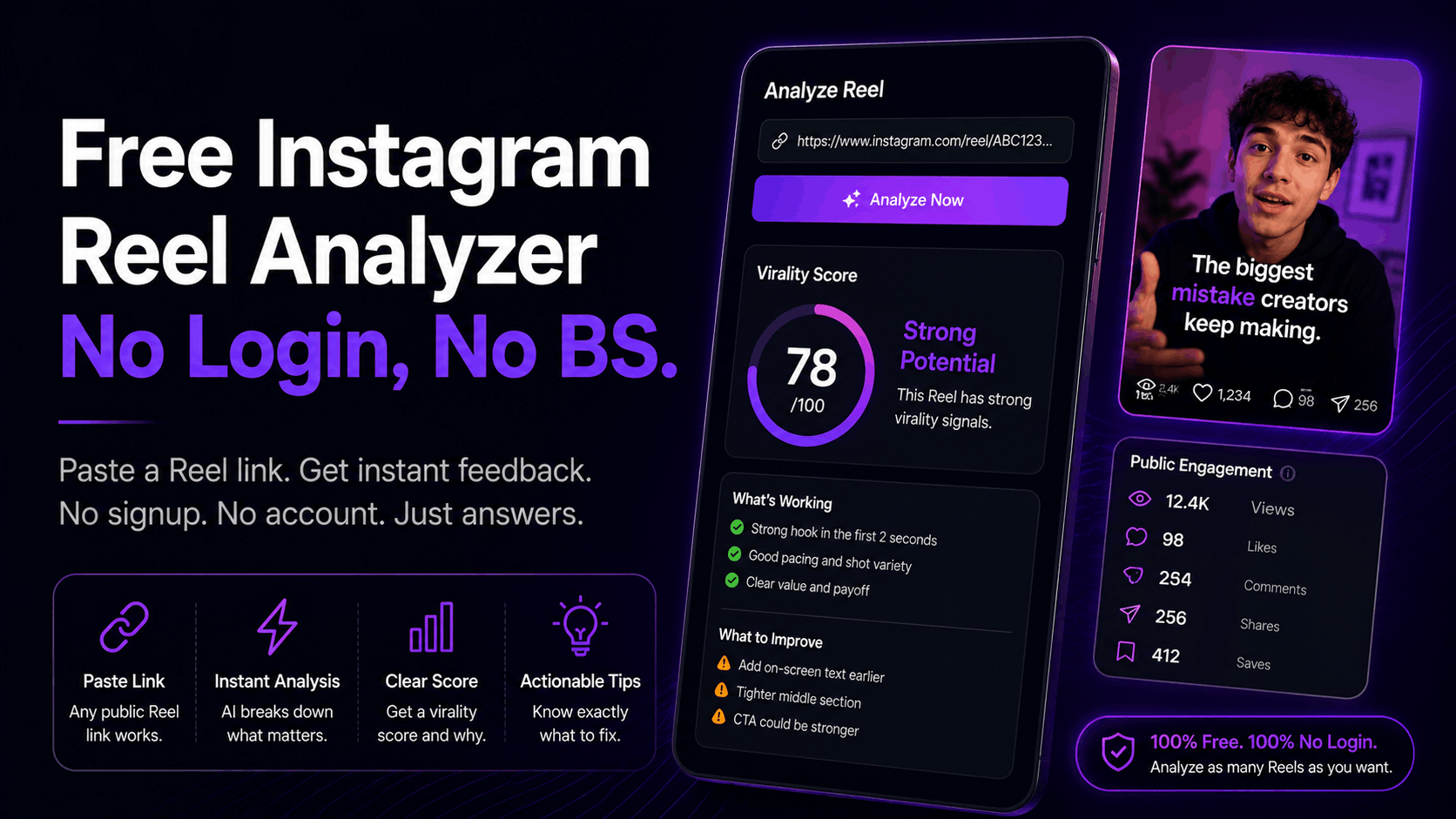
TL;DR: A free Instagram Reel analyzer with no login lets you paste a Reel link and get performance feedback without handing over an email or connecting your account. Most tools that advertise "free" gate the results behind a signup form. This guide covers which ones don't, what a tool can actually see from a public link, and how to read a virality score so it changes what you post next.
You clicked a free Instagram Reel analyzer, pasted your link, watched the loading bar fill up, and then got hit with a form. Enter your email to see your results. Maybe connect your Instagram account too, while you're at it.
That's not a free tool. That's a lead magnet wearing a costume.
The frustrating part is that the thing you wanted takes about ten seconds to compute. You had one Reel that underperformed and you wanted to know why before you posted the next one. Instead you traded your inbox for a generic score and three tips you'd already read on TikTok.
There are real no-login analyzers out there. There are also real limits on what any of them can see, and most articles on this topic won't tell you about those limits because they're trying to sell you something.
So here's the honest version. What these tools do, what they can't do, what your own Instagram Insights won't tell you either, and how to actually use the output. If your Reels stopped getting views and you want a diagnosis instead of a guess, this is the piece.
What Is a Free Instagram Reel Analyzer?
A free Instagram Reel analyzer is a tool that takes a public Reel link and returns feedback on why that video performed the way it did. It looks at things like the opening seconds, pacing, on-screen text, and public engagement. No-login versions do this without an account connection, so you get results in one step.
The good ones go past a number. They tell you which part of the video lost people and what to change. The weak ones give you a score out of 10 and leave you to figure out the rest, which is roughly as useful as a doctor telling you your health is a 6.
Two claims get mixed up constantly in this category, and they're not the same thing:
- Free means you don't pay money.
- No login means you don't create an account or hand over an email.
A tool can be one and not the other. Most are free without being no-login. That's the trap this whole search exists because of.
Why Do Most "Free" Reel Analyzers Make You Sign Up?
Because your email is the product. A free analyzer costs the company almost nothing to run, and every person who pastes a link is a warm lead who just told them exactly what they're struggling with. The signup wall isn't there to protect data. It's there to build a list.
That's not evil, it's just marketing, and it's worth understanding so you can spot it fast. If a tool asks for your email before showing anything, the analysis is the bait.
There's one legitimate reason to require a login, though, and it's worth separating out. Some data only exists inside your account. Watch time, retention curves, and audience breakdowns come from Instagram's API and require real authorization. A tool asking you to connect an account to show you your own private metrics is doing something honest. A tool asking for your email to show you a public score is not.
The nuance here matters. Conversion research from CXL on reducing form fields found the picture isn't as simple as "fewer fields always wins," and in one case removing three fields actually dropped conversions by 14%. Friction isn't automatically bad. But friction placed between you and the thing you were promised is a different story.
What Can a No-Login Analyzer Actually See?
A no-login analyzer sees two things: the video file itself and whatever Instagram makes public. That means it can analyze your hook, pacing, cuts, captions, text placement, and audio, plus public view, like, and comment counts. It cannot see private data like watch time, retention curves, or where your audience came from.
That split is the whole ballgame, so it's worth sitting with.
What it can analyze well: the craft. The first three seconds, whether your text competes with your subject, whether your cuts land on beats, whether the payoff arrives before people scroll. This is the stuff that decides most outcomes, and it's all visible in the video itself.
What it can't see: your private numbers. Average watch time, your retention graph, follower versus non-follower reach. Those live in your account.
Public engagement still tells you more than people assume. Saves and shares in particular carry real weight, and research from Colorado State on hidden engagement metrics points to both as signals the algorithm leans on harder than likes. A Reel with a modest like count and a high share count is doing something right.
So a no-login tool is genuinely useful for the question "what's wrong with this video," and genuinely limited for the question "what did my audience do." You want both eventually. You just don't need to hand over an email to get the first one.
Instagram Insights Has Blind Spots Too
Here's the part the tool comparison articles skip. Native Insights isn't the complete picture people treat it as, and it's gotten less complete recently.
In 2025, Instagram made Views its primary metric, replacing Plays and Impressions across the app. Iconosquare's rundown of the deprecated Instagram metrics confirms the older numbers went away in April of that year. If you've been comparing this month's numbers to last year's, you may be comparing two different things without realizing it.
It gets thinner from there. According to the same Instagram Insights reporting documentation:
- Story data is only available for the past 24 hours through the API. Miss the window and it's gone.
- New follower data is capped at 30 days. Longer comparisons can error out entirely.
- Reach isn't directly available. It gets estimated over 1, 7, or 28 day intervals, and that estimate "may not perfectly match your account's actual reach."
- Carousels report almost nothing. Two metrics, video views and plays, and that's it.
- Data lags 24 to 48 hours before it's reportable.
None of that makes Insights useless. It makes it partial. Insights tells you what happened. It doesn't tell you why, and it definitely doesn't tell you before you post. If you want a deeper breakdown of the numbers worth watching, we covered which Reels metrics matter separately.
How Do You Read a Virality Score?
A virality score is a single number predicting how likely a video is to get distributed, usually on a 1 to 10 scale or a letter grade. On its own it's close to useless. It's only worth anything if it comes with the reason behind it, which part of the video caused it, and what to change.
Think of the score as the headline and the breakdown as the article. Nobody ever fixed a Reel by learning it was a 4.
When you look at any analyzer's output, these three things are what you're actually hunting for:
1. Hook diagnosis. Your first three seconds decide the rest. Instagram's own leadership has said repeatedly that this window determines whether the algorithm pushes your content past your existing audience, as covered in Hootsuite's breakdown of the Instagram algorithm. We went deep on how to measure this in our guide to hook rate. If your tool can't tell you whether your hook is the problem, it isn't analyzing much.
2. Pacing and drop-off shape. Where does attention leak? A video that loses people at second two has a hook problem. One that loses them at second eight has a payoff problem. Different fixes entirely.
3. Comparison to your own baseline. A 6 out of 10 means nothing without knowing your usual. This is where scoring one video at a time falls short, and where analyzing your back catalogue starts to pay off.
You can test this on a Reel right now. The Wave Vision analyzer is free with no signup, so you can run a free analysis and see the score and grade on your own content in about thirty seconds. Straight answer on the limits: the free tier gives you three analyses a day and the full breakdown sits behind the trial. We'd rather say that up front than be the thing this article is complaining about.
What Good Actually Looks Like for Reels
Scores are relative. Benchmarks are how you know if your number is genuinely bad or just bad compared to a fantasy.
The metric that matters most is retention, sometimes called view-through rate, which is your average watch time divided by video length. Retention benchmarks for Instagram Reels break down roughly like this:
Video lengthGoodStrongUnder 15 seconds65%+75%+15 to 30 seconds50%+60%+30 to 60 seconds40 to 50%55%+Over 60 seconds35%+45%+
Your niche shifts these numbers too. The same research puts comedy and entertainment above 70% for short videos, education around 50%, and finance or business closer to 40%. A finance creator hitting 45% is doing well. A comedy creator hitting 45% has a problem. Same number, opposite verdict.
If you post to TikTok as well, the TikTok retention benchmarks run on similar logic, and we've written about how to analyze a TikTok before posting too.
How Do You Turn a Low Score Into a Better Reel?
Match the fix to the failure point. If people leave in the first three seconds, rebuild the opening. If they leave in the middle, tighten the pacing. If they watch to the end but don't engage, the video worked and the ask didn't. Fix one thing per Reel so you know what caused the change.
Pattern 1: drop-off at second 2 or 3. Your hook is doing setup instead of delivering. Cut the intro entirely and start at the interesting part. Show the result first, explain second.
Pattern 2: drop-off in the middle. You're taking too long. Trim dead air between sentences, cut the ramp-up, and get the payoff in earlier. Most middle-drop videos improve by getting 20% shorter with nothing meaningful removed.
Pattern 3: strong retention, weak reach. This one's frustrating because the video itself is fine. The problem is usually distribution, not craft, which is a different diagnosis entirely and often looks like being stuck in 200 view jail.
Change one variable at a time. If you rewrite the hook, shorten the video, and swap the audio all at once, you learn nothing from the result.
Three things worth keeping. "Free" and "no login" are separate claims, and most tools only deliver the first. A score without a reason attached is noise, so judge any analyzer by whether it tells you which part of your video failed. And your own benchmark beats a generic one every time, because a 45% retention rate is either great or terrible depending entirely on what you make.
The fastest way to know where you stand is to check one Reel that underperformed and one that did well, then compare. That takes about a minute and usually the difference is obvious once you can see both.
If you want the full breakdown rather than the surface score, start your $1 trial and you get 30 days and 50 analyses a day to work through your back catalogue. That's enough to stop guessing about what your audience actually watches.
Frequently Asked Questions
Is there a truly free Instagram Reel analyzer with no signup?
Yes, though the category is small and most tools advertising "free" still collect an email before showing results. Wave Vision's analyzer runs without a signup and gives you three analyses a day, with the deeper breakdown available on a paid plan. Test any tool by checking whether results appear before it asks for anything.
Can a Reel analyzer work on someone else's account?
For public Reels, generally yes. A no-login analyzer works from the public link, so it can review a competitor's video the same way it reviews yours. It can't see their private data like watch time or audience demographics, since that only exists inside their account.
Do these tools need my Instagram password?
No, and you should never give one out. Legitimate tools that need account data use Instagram's official authorization flow, where you approve access through Instagram itself and can revoke it anytime. No-login analyzers skip this entirely because they only read public information.
How accurate are AI virality scores?
They're better at diagnosis than prediction. A score can reliably flag a weak hook, slow pacing, or a cluttered frame, since those are visible in the video. Predicting exact view counts is much harder, because distribution depends on timing, audience, and platform behavior no tool can see. Treat the score as a second opinion, not a verdict.
What's the difference between a Reel analyzer and Instagram Insights?
Insights reports what happened to your video after you posted it, using private account data. An analyzer examines the video itself and tells you why it performed that way, which you can do before posting. Insights also has real gaps: Story data lasts only 24 hours and reach is estimated rather than measured. The two work best together.
Frequently asked questions
Is there a truly free Instagram Reel analyzer with no signup?
Yes, though the category is small and most tools advertising free still collect an email before showing results. Wave Vision's analyzer runs without a signup and gives you three analyses a day, with the deeper breakdown available on a paid plan. Test any tool by checking whether results appear before it asks for anything.
Can a Reel analyzer work on someone else's account?
For public Reels, generally yes. A no-login analyzer works from the public link, so it can review a competitor's video the same way it reviews yours. It can't see their private data like watch time or audience demographics, since that only exists inside their account.
Do these tools need my Instagram password?
No, and you should never give one out. Legitimate tools that need account data use Instagram's official authorization flow, where you approve access through Instagram itself and can revoke it anytime. No-login analyzers skip this entirely because they only read public information.
How accurate are AI virality scores?
They're better at diagnosis than prediction. A score can reliably flag a weak hook, slow pacing, or a cluttered frame, since those are visible in the video. Predicting exact view counts is much harder, because distribution depends on timing, audience, and platform behavior no tool can see. Treat the score as a second opinion, not a verdict.
What's the difference between a Reel analyzer and Instagram Insights?
Insights reports what happened to your video after you posted it, using private account data. An analyzer examines the video itself and tells you why it performed that way, which you can do before posting. Insights also has real gaps: Story data lasts only 24 hours and reach is estimated rather than measured. The two work best together.