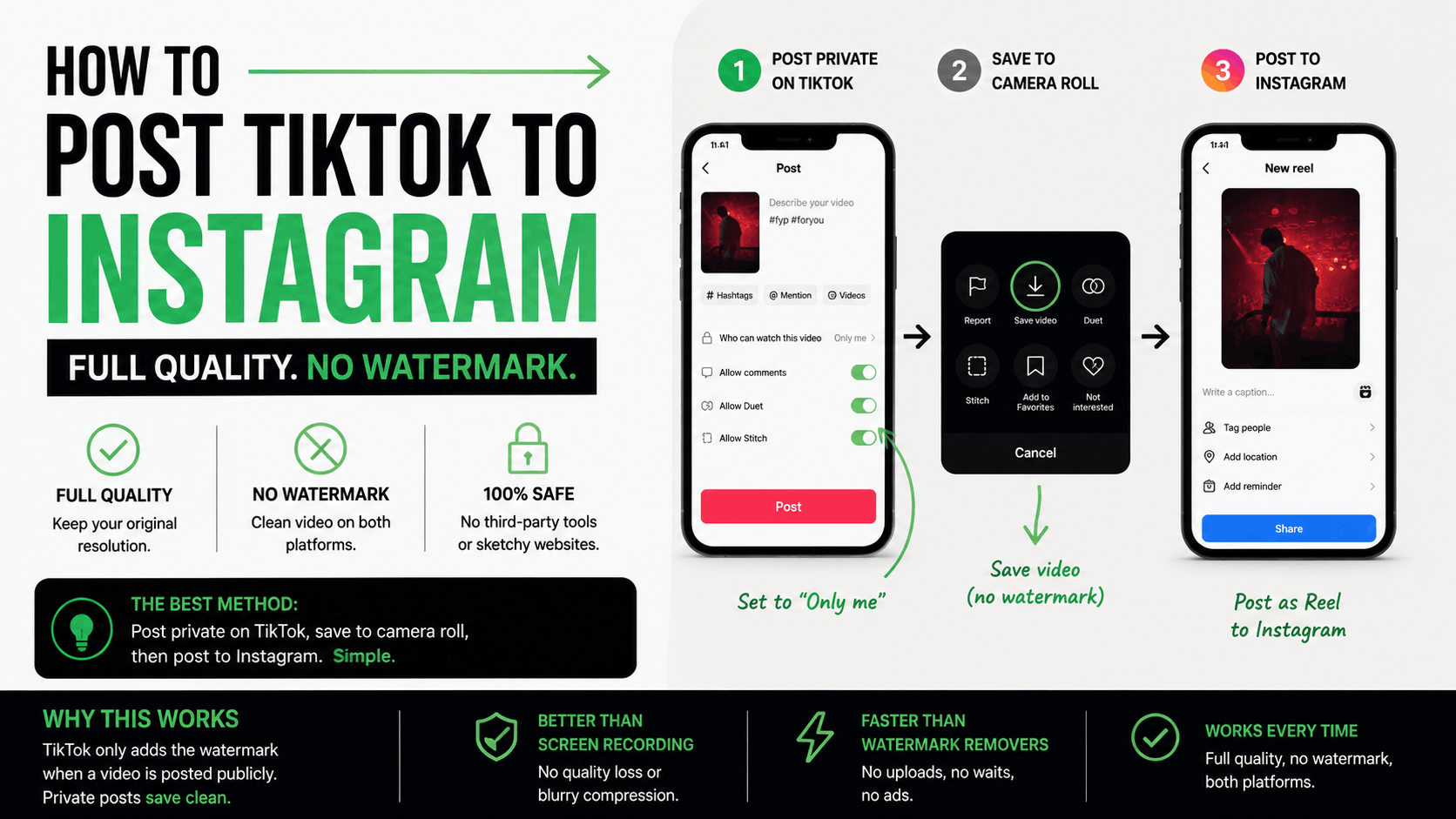
TL;DR: The best way to post a TikTok video to Instagram in full quality without a watermark is to post it as private on TikTok first, save it to your camera roll from that private post, then post the downloaded file to Instagram. Once it's posted on Instagram, go back and post the original video publicly on TikTok. This avoids third-party watermark removers and keeps your video at full resolution on both platforms.
Why You Shouldn't Just Screen Record or Share Directly to Instagram
The two most common ways people try to cross-post from TikTok to Instagram both come with real costs. Sharing directly from TikTok's built-in share button adds a visible TikTok watermark and username to your video, and Instagram's algorithm actively suppresses Reels with a visible TikTok watermark, treating it as recycled, off-platform content rather than something native to Instagram.
Screen recording avoids the watermark issue but trades it for a different problem: quality loss. You're recompressing an already-compressed video through your screen recorder, which introduces blur, pixelation, and artifacts that are especially obvious on faster cuts or text overlays.
Third-party watermark removal tools solve the logo problem but introduce a new one: you're uploading your content to a site you don't control, and the output is usually still a recompressed, lower-resolution copy of what you originally filmed. None of these three options actually gets you the full-quality file you started with.
The Best Method: Post Private, Save to Camera Roll
After testing pretty much every workaround, the cleanest method I've found is one TikTok's own settings make possible without any third-party tool. Post your video to TikTok with the privacy setting on "Only me" instead of public. Then open that private post, tap the three-dot menu, and hit "Save video" to download it straight to your camera roll.
Because the video was never public, there's no watermark logic triggered, and because you're downloading directly from TikTok's own export rather than through a screen recording or a browser tool, you keep the full resolution of your original file. From there, you have a clean, full-quality copy sitting in your camera roll that's ready to post to Instagram exactly as filmed.
Step-by-Step: How to Do It
Here's the exact process. Upload your video to TikTok as you normally would, with your captions, effects, and sound in place. Before you hit post, change the privacy setting to "Only me" instead of public or friends. Post it.
Once it's live as a private post, open it from your profile, tap the three-dot share icon, and select "Save video." This downloads the full-quality file to your camera roll with no watermark, since it was never posted publicly in the first place.
Now open Instagram and post that saved file as a Reel. Once it's live on Instagram, go back to TikTok and post the same video publicly, either by re-uploading the original edit or changing the private post's visibility if the platform allows it. Either way, you end up with a full-quality version live on both platforms and no watermark on either one.
Why This Works Better Than Watermark Remover Tools
Third-party watermark removers all run your video through an extra layer of processing you don't control, and that extra step is exactly where quality gets lost. Even tools that advertise "no watermark" downloads are often pulling a compressed version of your video rather than the original file you exported from your editing app.
The private-post method skips that entirely. You're not uploading your video to an outside site, you're not waiting on a third-party server to process it, and you're not trusting an unfamiliar tool with your content before it's ever gone public. You're using TikTok's own save function on a version of the post that was never made visible to anyone but you, which means the export is as close to your original file as you're going to get without keeping a separate master copy in your editing software.
It's also just faster. No pasting links into a browser tool, no waiting for a queue, no ads. Post private, save, post to Instagram, then post public on TikTok.
What to Do After You Have the Clean File
Once you've got the clean, full-quality file saved, the order you post in matters less than making sure both versions actually go live. Post to Instagram first while the file is fresh in your camera roll, since it's easy to forget which download is the clean one if you wait too long or repeat this process across several videos in a batch.
Then go back to TikTok and publish the video publicly, the same way you always would. At that point you have two live, full-quality, watermark-free posts, one native to each platform, without ever touching a third-party tool.
If you're batching this across multiple videos in one sitting, which is common if you're running a multi-account documentation series across platforms, it's worth labeling your camera roll saves as you go, since it's easy to lose track of which private-post download matches which caption once you're five videos deep.
Common Mistakes When Cross-Posting TikTok to Instagram
A few mistakes show up constantly with cross-posting, and most of them come down to skipping a step in the process above.
The biggest one is forgetting to switch the TikTok post to "Only me" before saving, which either publishes the watermarked version publicly by accident or means you're saving a version that still carries TikTok branding. Double check the privacy toggle before you hit post.
The second is posting the Instagram version and then forgetting to make the TikTok post public afterward, which leaves your original video sitting unseen in a private post indefinitely. Set a habit of finishing the loop, post Instagram, then flip TikTok public, every single time.
The third is assuming any full-quality repost will perform the same on both platforms. Even with a clean, watermark-free file, TikTok and Instagram reward different things: Instagram leans more heavily on saves and shares, while TikTok weighs completion rate most heavily. A video that performs well on one platform isn't guaranteed to hit the same on the other, even at identical quality.
How to Track Performance Once You're Cross-Posting
Once you're consistently posting full-quality content to both platforms, the next question is whether it's actually working the same way on each one. That's where checking your numbers side by side matters, since native analytics only ever show you one platform at a time.
If you want to see how a cross-posted video's hook and retention compare across TikTok and Instagram in one place, you can run it through our free video analyzer to get a quick read on hook strength before you decide where to post next. For ongoing tracking across both platforms, our post on tracking multiple social accounts in one dashboard walks through setting that up properly.
Conclusion
Cross-posting TikTok to Instagram doesn't have to mean a blurry, watermarked repost or a trip through a sketchy third-party tool. Posting private, saving from that private post, and publishing to Instagram before making the TikTok version public gets you a full-quality, watermark-free file on both platforms using nothing but the settings TikTok already gives you.
If you want to see how your cross-posted content is actually performing on each platform, start your $1 trial with Wave Vision and connect your TikTok and Instagram accounts to compare hook strength and retention side by side.
Frequently Asked Questions
**How do I post a TikTok video to Instagram without the watermark?**Post the video privately on TikTok first by setting it to "Only me," then save it to your camera roll from that private post using the three-dot share menu. This gives you a full-quality, watermark-free file to post on Instagram, since the watermark is only added when a video has been published publicly.
**Does Instagram actually penalize videos with a TikTok watermark?**Yes. Instagram's algorithm generally suppresses reach on Reels that carry a visible TikTok watermark, treating them as recycled off-platform content rather than native Instagram video.
**Is it safe to use third-party watermark remover tools?**It's generally not recommended. Most third-party tools require uploading your video to a site you don't control, and the resulting file is often a recompressed, lower-quality copy rather than your original export.
**Should I post to Instagram or TikTok first when cross-posting?**Post to Instagram first using the clean file saved from your private TikTok post, then make the TikTok post public afterward. This order keeps you from accidentally leaving the TikTok version stuck in private while you handle the Instagram upload.
**Do TikTok and Instagram reward the same kind of content?**Not exactly. TikTok weighs completion rate most heavily in its algorithm, while Instagram leans more on saves and shares. The same full-quality video can perform differently on each platform even without any quality loss.
Frequently asked questions
How do I post a TikTok video to Instagram without the watermark?
Post the video privately on TikTok first by setting it to "Only me," then save it to your camera roll from that private post using the three-dot share menu. This gives you a full-quality, watermark-free file to post on Instagram, since the watermark is only added when a video has been published publicly.
Does Instagram actually penalize videos with a TikTok watermark?
Yes. Instagram's algorithm generally suppresses reach on Reels that carry a visible TikTok watermark, treating them as recycled off-platform content rather than native Instagram video.
Is it safe to use third-party watermark remover tools?
It's generally not recommended. Most third-party tools require uploading your video to a site you don't control, and the resulting file is often a recompressed, lower-quality copy rather than your original export.
Should I post to Instagram or TikTok first when cross-posting?
Post to Instagram first using the clean file saved from your private TikTok post, then make the TikTok post public afterward. This order keeps you from accidentally leaving the TikTok version stuck in private while you handle the Instagram upload.
Do TikTok and Instagram reward the same kind of content?
Not exactly. TikTok weighs completion rate most heavily in its algorithm, while Instagram leans more on saves and shares. The same full-quality video can perform differently on each platform even without any quality loss.