TL;DR: Cheap social media analytics software generally falls in the $0 to $50 a month range, and the real question isn't which tool is cheapest, it's which cheap tool gives you enough to actually act on. Free native analytics work fine for a while, but they cap your historical data, don't compare platforms side by side, and don't tell you why a video underperformed. This post breaks down what "cheap" actually gets you, where the free tier runs out, and which budget tools are worth using.
What Counts as "Cheap" for Social Media Analytics Software
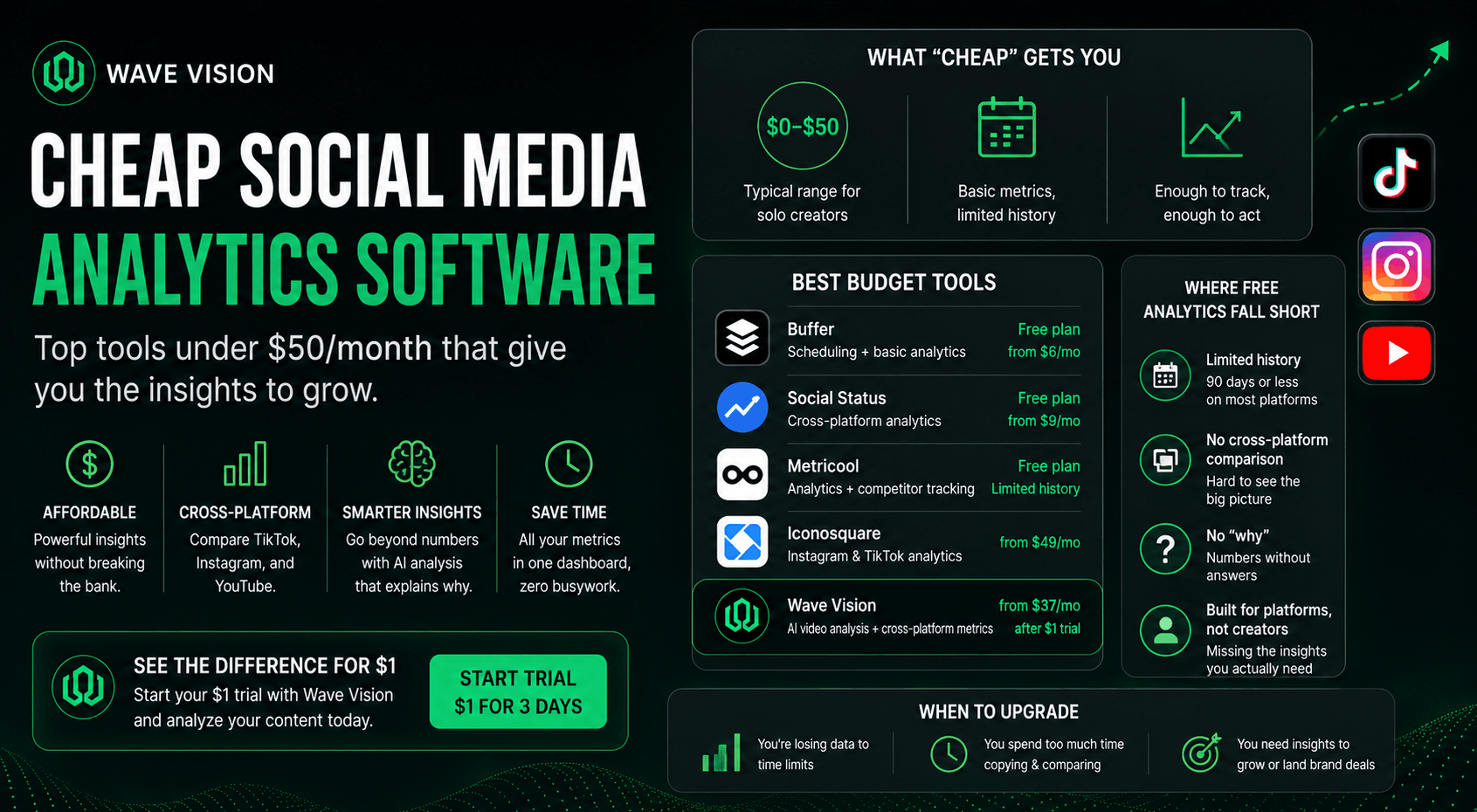
Pricing for social media analytics software spans a huge range, from free to well over $500 a month, and knowing where you sit on that scale changes what you should expect. Solo creators and small accounts typically fall in the $0 to $50 a month bracket, while growing teams spend $100 to $300, and agencies often pay $200 to $500 or more.
For context on the higher end, Sprout Social's plans run $249 to $499 a month per user, and Hootsuite starts around $99 a month per user after dropping its free plan entirely. Those tools are built for teams managing client accounts and reporting to stakeholders, not a solo creator trying to figure out why their last Reel flopped. If you're in that second group, paying enterprise prices for enterprise features you'll never touch is money wasted.
Why Free Native Analytics Only Gets You So Far
Every major platform gives you free analytics: Instagram Insights, TikTok Studio, YouTube Analytics. For a solo creator just starting out, these are genuinely enough for the first several months.
The limits show up as you grow. Instagram caps historical data at roughly 90 days before it disappears for good, and TikTok's window is even shorter. If you want to compare this month's performance to six months ago, you either exported the numbers before the window closed or you're starting from scratch. Native tools also only show you your own account, so there's no way to compare performance across TikTok, Instagram, and YouTube without manually copying numbers into a spreadsheet, which is exactly the kind of busywork we broke down in our post on tracking multiple social accounts in one dashboard.
The bigger gap is depth. Native analytics will tell you a video got 40% retention. They won't tell you why. That distinction matters more than it sounds, since knowing a number without knowing the cause means you're stuck guessing at fixes instead of making them.
The Cheapest Social Media Analytics Tools Worth Considering
Here's how the budget tier actually breaks down once you move past native, platform-only analytics.
Buffer offers a genuinely usable free plan for up to three channels, with paid tiers starting around $6 a month per channel. It leans more toward scheduling with analytics attached than deep performance insight, but it's a solid entry point if budget is your only constraint.
Social Status keeps a permanent free plan with reduced quotas, and its paid tier starts around $9 a month, making it one of the cheapest true cross-platform analytics options available.
Metricool's free plan covers about three months of historical data and basic competitor tracking, which is more generous than most native tools, though the useful features start once you move to a paid plan.
Iconosquare runs around $49 a month and focuses specifically on Instagram and TikTok depth, which makes it a reasonable pick if you're not posting to YouTube.
Wave Vision sits at $37 a month after a $1 trial, and takes a different approach than the scheduling-first tools above. Instead of just aggregating engagement numbers, it connects your TikTok, Instagram, and YouTube accounts and runs AI Video Analysis on your content, so you're not just seeing that a video underperformed, you're seeing why. That's a meaningfully different job than what most budget tools in this range are built to do.
What You Give Up at the Cheapest Price Points
Even among paid budget tools, a few things consistently get cut to hit a lower price. Knowing what you're giving up helps you pick the right tradeoff instead of getting surprised later.
Historical data retention is usually the first cut. Free and entry-tier plans often cap at 90 days to a year, while mid-tier and higher plans extend that to two years or more, which matters if you want to spot seasonal patterns in your own content.
Competitor benchmarking is another common cut. Budget tools generally show you your own performance only, while pricier platforms like Rival IQ or Socialinsider let you compare your engagement rate directly against specific competitors.
The third, and the one that matters most for creators specifically, is content-level feedback. Most budget analytics tools stop at showing you a number. They won't tell you that your hook is the problem, or that your pacing loses viewers at the eight-second mark. We covered exactly what that kind of feedback looks like in our post on hook analysis tools for short-form video, and it's the gap that separates a dashboard from something you can actually act on.
Where Wave Vision Fits in the Budget Tier
We built Wave Vision specifically for the creator who's outgrown native analytics but doesn't need, or want to pay for, an agency-grade platform. At $37 a month, it sits comfortably inside the "cheap" bracket most solo creators are shopping in, and the $1 trial means you can test it against your actual content before committing.
The difference from the scheduling-first tools in this price range is what happens after you connect your accounts. You get side-by-side metrics from TikTok, Instagram, and YouTube, plus AI Video Analysis that scores individual videos and explains what's driving performance. If you're a UGC creator specifically trying to prove your value to brands rather than just track vanity metrics, our guide to analytics for UGC creators walks through exactly which numbers matter for that pitch.
How to Know When It's Time to Pay for Analytics
There are a few clear signals that free native analytics have stopped being enough, and they're worth checking against your own workflow before you commit to a paid tool.
If you're regularly exporting data by hand before Instagram's 90-day window closes, or copying numbers between apps to compare platforms, that time cost alone usually justifies a low-cost tool. If you can point to a specific question native analytics can't answer, like why one video's retention dropped sharply at a certain second, that's a sign you need content-level feedback, not just more dashboards. And if you're starting to pitch brands or sell UGC work, having current, exportable, cross-platform numbers ready in one place speeds up every pitch you send.
None of these signals require jumping straight to a $250-a-month enterprise tool. They just mean it's time to move past what's free.
Conclusion
Cheap doesn't have to mean limited, but it's worth knowing exactly what you're trading off at every price point. Free native analytics carry you through the first stretch of growing an account, budget scheduling tools add basic cross-platform tracking, and a tool like Wave Vision adds the content-level feedback that actually tells you why something worked.
If you want to see what your TikTok, Instagram, and YouTube performance looks like side by side, with AI feedback on what to fix, start your $1 trial with Wave Vision and run your last few posts through it before you decide what to pay for long term.
Frequently Asked Questions
**What is the cheapest social media analytics software?**Free native platform analytics (Instagram Insights, TikTok Studio, YouTube Analytics) are the cheapest option at $0, though they're limited to a single platform. For cross-platform tracking, budget paid tools like Social Status and Buffer start around $6 to $9 a month, while Wave Vision starts at $37 a month after a $1 trial.
**Is free social media analytics enough for small creators?**For a solo creator posting to two or three platforms and just starting out, free native analytics are often sufficient for the first several months. The limits usually show up around historical data caps and the inability to compare performance across platforms in one view.
**What's the difference between cheap analytics tools and enterprise tools?**Cheap tools typically limit historical data retention, skip competitor benchmarking, and focus on basic engagement metrics. Enterprise tools like Sprout Social or Hootsuite add team collaboration, deeper historical data, and competitive intelligence, usually at $99 to $500+ a month.
**Do budget analytics tools explain why content underperforms?**Most budget analytics tools show you a number, like a retention or engagement rate, without explaining the cause. Tools with AI video analysis, like Wave Vision, go a step further by identifying specific issues like a weak hook or pacing problem.
**How much should a solo creator expect to pay for social media analytics?**Solo creators and small accounts typically fall in the $0 to $50 a month range for analytics software, which covers everything from free native tools to AI-powered platforms like Wave Vision at $37 a month.
Frequently asked questions
What is the cheapest social media analytics software?
Free native platform analytics (Instagram Insights, TikTok Studio, YouTube Analytics) are the cheapest option at $0, though they're limited to a single platform. For cross-platform tracking, budget paid tools like Social Status and Buffer start around $6 to $9 a month, while Wave Vision starts at $37 a month after a $1 trial.
Is free social media analytics enough for small creators?
For a solo creator posting to two or three platforms and just starting out, free native analytics are often sufficient for the first several months. The limits usually show up around historical data caps and the inability to compare performance across platforms in one view.
What's the difference between cheap analytics tools and enterprise tools?
Cheap tools typically limit historical data retention, skip competitor benchmarking, and focus on basic engagement metrics. Enterprise tools like Sprout Social or Hootsuite add team collaboration, deeper historical data, and competitive intelligence, usually at $99 to $500+ a month.
Do budget analytics tools explain why content underperforms?
Most budget analytics tools show you a number, like a retention or engagement rate, without explaining the cause. Tools with AI video analysis, like Wave Vision, go a step further by identifying specific issues like a weak hook or pacing problem.
How much should a solo creator expect to pay for social media analytics?
Solo creators and small accounts typically fall in the $0 to $50 a month range for analytics software, which covers everything from free native tools to AI-powered platforms like Wave Vision at $37 a month.